
Feature
Liver Health Trend Tracking
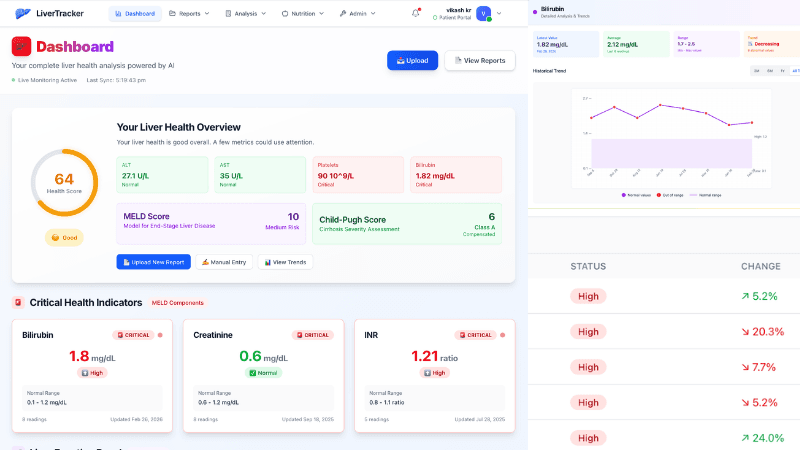
Visualize how your liver markers change over time with interactive charts. Track ALT, AST, bilirubin, albumin, INR, platelets, and MELD scores — all in one place with flexible time range filters.
Key Benefits
Interactive Charts for Every Marker
Dedicated trend lines for ALT, AST, bilirubin, albumin, INR, platelets, and more. Hover to see exact values and dates.
Time Range Filters
Switch between 3-month, 6-month, 1-year, and All Time views to focus on the period that matters most.
MELD Score Trend Line
Track your MELD, MELD-Na, and MELD 3.0 scores over time to monitor disease progression or improvement.
Consolidated Lab Report View
See all your lab values side by side in a unified table — every report, every marker, one screen.
Compare Values Across Reports
Instantly compare values between any two reports to see what changed and by how much.
Export to PDF
Download your trend charts and consolidated data as a clean PDF to share with your doctor or keep for your records.
How It Works
Upload Your Reports
Upload blood work PDFs or photos from any lab. Our AI reads and extracts every liver-related value automatically.
AI Extracts Values
Liver enzymes, bilirubin, albumin, INR, platelets, and other markers are identified and stored on your timeline.
View Your Trends
Open the trend dashboard to see interactive charts for each marker. Use time filters to zoom in on specific periods.
Share With Your Doctor
Export your trends as a PDF or share directly with your healthcare provider through secure doctor sharing.
Frequently Asked Questions
What markers are tracked?▾
How far back can I see my trends?▾
Can I export my trends?▾
How are MELD scores calculated?▾
Can I manually add values?▾

Don't Wait Until It's Too Late
Liver damage is often silent. Start monitoring your liver function today and catch changes early — before they become serious.
See Your Liver Health Trends
Upload your lab reports and watch your liver markers come to life on interactive charts.
Get Started FreeMore Features