Feature
Imaging & Endoscopy Tracking
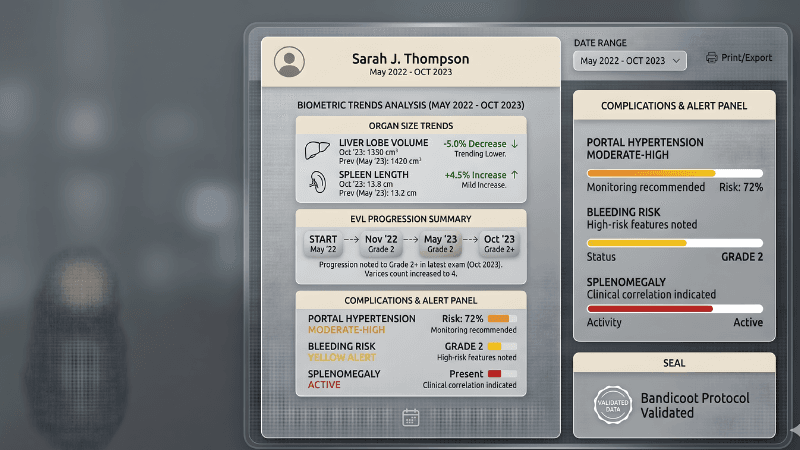
Track CT scans, ultrasounds, MRIs, endoscopy reports, and FibroScan results in one place. Monitor organ sizes, varices progression, EVL treatments, and complications over time.
Key Benefits
Track All Imaging Types
Upload and track CT scans, MRIs, ultrasounds, and endoscopy reports. Every imaging modality in one unified timeline.
EVL Treatment Progress Tracker
Monitor your endoscopic variceal ligation (EVL) sessions, band counts, and treatment outcomes over time.
Varices Grading History
Track how your esophageal varices grading changes across endoscopy reports — from Grade I to Grade IV.
Organ Size Monitoring
Follow liver size, spleen size, and other organ measurements across imaging reports to detect changes early.
Complications Detection
AI identifies and tracks complications like ascites, portal hypertension, hepatic encephalopathy, and varices from your reports.
FibroScan Integration
FibroScan results are integrated alongside your other imaging data for a complete picture of liver stiffness over time.
How It Works
Upload Imaging Report
Upload your CT, MRI, ultrasound, or endoscopy report as a PDF or photo. Any format from any hospital works.
AI Extracts Findings
Our AI reads the radiology or endoscopy report and extracts key findings — organ sizes, varices grading, lesions, and complications.
Track Changes Over Time
See how findings change across reports. Compare liver sizes, varices grades, and other measurements on a visual timeline.
Monitor Complications
Get a clear overview of detected complications and how they're progressing. Share the full picture with your doctor.
Frequently Asked Questions
What imaging types are supported?▾
How does EVL tracking work?▾
Can I track FibroScan results here?▾
What complications does it detect?▾
Can my doctor see my imaging history?▾
Don't Wait Until It's Too Late
Liver damage is often silent. Start monitoring your liver function today and catch changes early — before they become serious.
Start Tracking Your Imaging Results
Upload your first CT, MRI, or endoscopy report and see your imaging history come together.
Get Started FreeMore Features